Home
Blöbbu is designed to simplify and secure file uploads to Azure Blob Storage by providing a standalone service that implements the tus resumable upload protocol.
Core Concept
A common way to upload files directly from a browser to Azure is using SAS (Shared Access Signature) tokens. While effective, SAS tokens have limitations regarding validation logic (e.g., enforcing maximum file size before the upload starts or during the streaming process).
Blöbbu acts as a secure intermediary:
- Validation: It validates upload requests based on rules defined by your application server.
- Streaming: It streams data directly to Azure Blob Storage without buffering the entire file in memory.
- Resumability: Being based on the
tusprotocol, it allows users to resume uploads after network interruptions. - Self-hosted: You host Blöbbu yourself, meaning the files never leave your infrastructure.
Basic Workflow
The typical integration involves three parties: the Client (Browser), your App Server, and the Blöbbu Server .
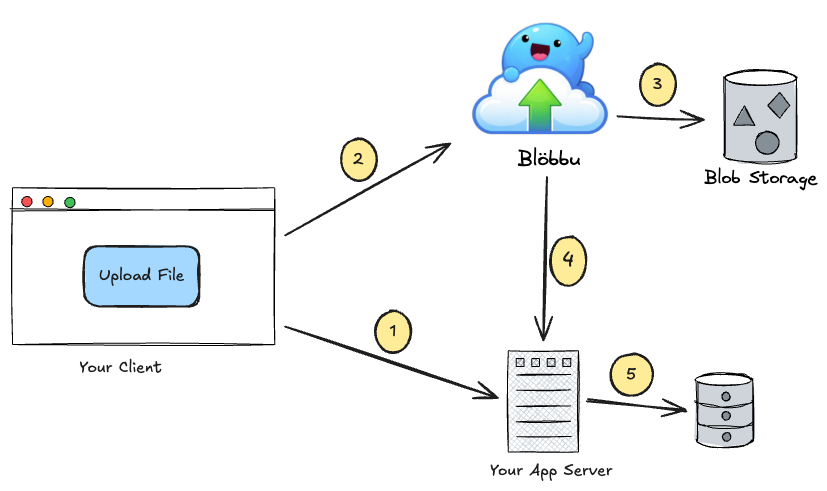
- Register Upload: The Client requests an upload JWT token from your App Server
- Direct Stream: The Client uploads the file directly to Blöbbu using a
tusclient (like Uppy) - Validate & Save: Blöbbu validates the JWT token and then streams it to Azure Blob Storage
- Completion: Once finished, Blöbbu can notify your App Server, or the Client can report success
- Reference: If necessary, the App Server stores a reference to the file in its own database
sequenceDiagram
  autonumber
  actor User
  participant Browser
  participant AppServer as App Server
  participant Blobbu as Blöbbu (tusd)
  participant BlobStorage as Blob Storage

  Note over User, Browser: Initialization
  User->>Browser: 1. Clicks upload button
  User->>Browser: 2. Chooses file
  Browser-->>Browser: 3. File selected

  Note over Browser, BlobStorage: Upload Flow
  Browser->>AppServer: 4. Request Upload token
  AppServer->>Blobbu: 5. Request Upload token
  Blobbu-->>AppServer: Return Upload token
  AppServer-->>Browser: Return Upload token

  Browser->>Blobbu: 6. Upload File (TUS Protocol)
  Blobbu->>BlobStorage: 7. Stream Data (Validation)
  BlobStorage-->>Blobbu: Ack
  Blobbu-->>Browser: Upload Complete

  Note over Browser, AppServer: Finalization
  Browser->>AppServer: 8. Report Success/Failure
Ready to bring your file uploads to the next level?
Head over to the Getting Started section to learn how to integrate Blöbbu into your application.